---
title: Challenges
description: As well as earning points through visits, purchases or minutes played, members can earn points by completing challenges. Challenges let you encourage…
---
[Skip to content](https://welcome.authic.io/en/knowledge-base/challenges-guide#main-content)
English
Show submenu for translations
[](https://www.authic.io/)
Open main navigation
Close main navigation
- English
Show submenu for translations
- [Authic Dashboard Login](https://app.authic.io/signin)
[Authic Dashboard Login](https://app.authic.io/signin)
How can we help you?
- There are no suggestions because the search field is empty.
1. [Authic Knowledge Base](https://welcome.authic.io/en/knowledge-base?hsLang=en)
2. [Product guide](https://welcome.authic.io/en/knowledge-base/product-guide?hsLang=en)
3. [Engagement and features](https://welcome.authic.io/en/knowledge-base/product-guide?hsLang=en#engagement-and-features)
# Challenges
As well as earning points through visits, purchases or minutes played, members can earn points by completing challenges. Challenges let you encourage behaviour that helps your goals, like more Instagram followers or new customers through referrals. Members take part through the **Challenges** section in the app, and points are awarded automatically once a challenge is completed.
Creating a challenge
1. Go to **Program \> Challenges** and create a new challenge.
2. Choose the type of challenge. You can filter by **Instagram, TikTok, Internal, Stamp cards, Referrals, Reviews** or **Other**.
3. Set how many points members get for completing it.
Can't find the challenge you're looking for? Click **Suggest challenge**. New templates are added regularly based on feedback.
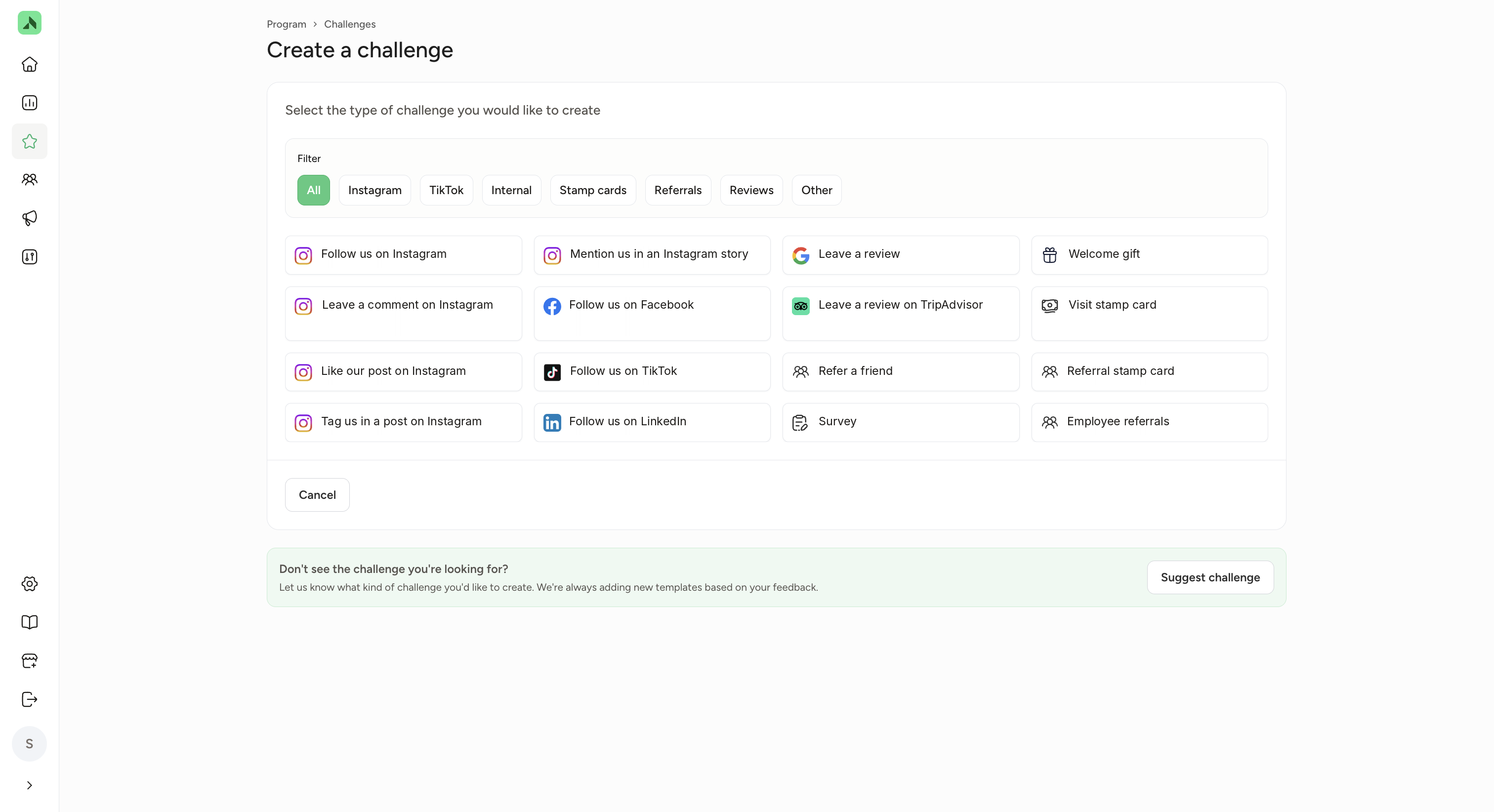
**Types of challenges**
There are loads of different challenges. Here are a few popular ones.
| Challenge | How it works |
| --- | --- |
| **Instagram** (follow, like, comment, tag in a post, mention in a story) | The member completes the action on Instagram through the challenge in the app and then gets the points. |
| **Follow on TikTok, Facebook or LinkedIn** | The member clicks the link in the challenge, follows your account and then gets the points. |
| **Refer a friend** | The member invites a friend to join the loyalty programme. Both the referrer and the new member get points, plus extra points after the friend's first visit or booking. |
| **Visit stamp card** | The member visits a set number of times within a period you choose. For example: visit 5 times in October and earn 500 extra points. You can also limit the stamp card to certain times, such as off-peak hours. |
| **Welcome gift** | New members get a starting bonus, for example 125 points. The member starts the challenge themselves via Challenges in the app. |
| **Google review** | The member clicks the link in the challenge, which opens your Google review page straight away. They write a review and then receive points for completing the challenge. If you have more than one location, each location gets its own review link. |
**How to get your Google review link**
A direct review link takes your customers straight to the "write a review" screen for your business on Google. This guide shows you how to find that link and how to share it.
**Before you start**
- You need access to your business's **Google Business Profile** (formerly Google My Business).
- If you have **multiple locations**, each location has its own review link. Repeat the steps below for every location.
**Step 1: Log in to your Google Business Profile**
Go to **google.com/business** and click **Manage now (or Sign in). Log in with the Google account that manages your business.**
**Step 2: Select your location and click "Ask for reviews"**
Once you're logged in, you'll see the **Your business on Google** panel. If you manage more than one location, first select the location you want the link for. Then click the **Ask for reviews**

**Step 3: Copy your review link**
A **Request reviews** window opens with your personal review link (it starts with https://g.page/r/...). Click the link field to copy it to the review challenge.
There are also challenges for things like a TripAdvisor review, a survey, a referral stamp card and employee referrals.
**Stamp cards**
A stamp card rewards members for repeat visits or referrals. Stamp cards sit right on the app's home screen, so members can always see their progress.
- Members earn a stamp for every qualifying visit or referral.
- Once the card is full, the member gets the points automatically.
- You can set up multiple levels. When a member completes level 1, they move straight on to level 2, and so on. Their progress carries over and they don't need to sign up again.
When you create one, you set:
- **Name and description** (up to 130 characters), for example "Visit 5 times and earn extra points".
- **Icon and colour:** choose a standard icon or upload your own.
- **Number of visits or referrals and points:** how many are needed and how many points the member gets for it. You can add extra levels; they're added to the challenge description automatically.
- **Availability:** the start and end date. For example, if the challenge runs for 60 days and a member starts on day 5, they have 55 days left.
- **Completion rules:** whether a member can complete the stamp card once or several times within the period.
Click **Save**. The stamp card appears under Challenges in the app. Members join automatically as soon as they have a qualifying visit or referral.
**Setting up refer a friend**
For a referral challenge, you enter how many points both the referrer and the new member get when the friend creates an account, and how many extra points they both get after the friend's first visit/booking or check-in. You also set the maximum number of times one member can complete the challenge.
**Extra challenges through your integration**
If you have an integration with your booking system, for example Playtomic or Bookaball, extra challenges sometimes become available. You'll find them under their own filter, named after that system.
| Integration | Examples of extra challenges |
| --- | --- |
| **Playtomic** | Play an open match, book a private lesson, book a course lesson, start a match, join your first tournament, Playtomic stamp card |
| **Bookaball** | Book a court, play an open match, attend a training session or trial lesson, join an event, join a group booking, complete a series or shared booking, Bookaball stamp card |
*Which challenges you see depends on your integration.*
**How many points should you give?**
Base the number of points on what members normally earn per visit. A challenge that takes more effort, like referring a friend, deserves a bigger reward. The more points, the more members will take it on.
**Points from challenges are reward points: members can only use them to claim rewards. They don't count towards tiers.**
- [Onboarding guide](https://welcome.authic.io/en/knowledge-base/onboarding-guide?hsLang=en#main-content)
- [Your onboarding timeline](https://welcome.authic.io/en/knowledge-base/onboarding-guide?hsLang=en#your-onboarding-timeline)
- [Go-live checklist](https://welcome.authic.io/en/knowledge-base/onboarding-guide?hsLang=en#go-live-checklist)
- [Promoting your app](https://welcome.authic.io/en/knowledge-base/onboarding-guide?hsLang=en#promoting-your-app)
- [Publishing your app](https://welcome.authic.io/en/knowledge-base/onboarding-guide?hsLang=en#publishing-your-app)
- [Product guide](https://welcome.authic.io/en/knowledge-base/product-guide?hsLang=en#main-content)
- [App settings](https://welcome.authic.io/en/knowledge-base/product-guide?hsLang=en#app-settings)
- [Rewards](https://welcome.authic.io/en/knowledge-base/product-guide?hsLang=en#rewards)
- [Engagement and features](https://welcome.authic.io/en/knowledge-base/product-guide?hsLang=en#engagement-and-features)
- [Communication](https://welcome.authic.io/en/knowledge-base/product-guide?hsLang=en#communication)
- [Analytics](https://welcome.authic.io/en/knowledge-base/product-guide?hsLang=en#analytics)
- [Marketing](https://welcome.authic.io/en/knowledge-base/product-guide?hsLang=en#marketing)
- [Settings](https://welcome.authic.io/en/knowledge-base/product-guide?hsLang=en#settings)
- [CRM Campaigns](https://welcome.authic.io/en/knowledge-base/product-guide?hsLang=en#crm-campaigns)
- [Inspiration guide](https://welcome.authic.io/en/knowledge-base/inspiration-guide?hsLang=en#main-content)
- [Reward inspiration](https://welcome.authic.io/en/knowledge-base/inspiration-guide?hsLang=en#reward-inspiration)
- [Tier inspiration](https://welcome.authic.io/en/knowledge-base/inspiration-guide?hsLang=en#tier-inspiration)
- [Membership inspiration](https://welcome.authic.io/en/knowledge-base/inspiration-guide?hsLang=en#membership-inspiration)
- [Bonus points and promotion ideas](https://welcome.authic.io/en/knowledge-base/inspiration-guide?hsLang=en#bonus-points-and-promotion-ideas)
- [Seasonal moments](https://welcome.authic.io/en/knowledge-base/inspiration-guide?hsLang=en#seasonal-moments)
- [CRM ideas](https://welcome.authic.io/en/knowledge-base/inspiration-guide?hsLang=en#crm-ideas)
[](https://welcome.authic.io/?hsLang=en)
[mailto:email@email.com](mailto:email@email.com)
Copyright © 2026, Authic Labs