
Bonus points let you give members extra points on top of what they earn through your loyalty type (per minute played, per euro spent or per check-in), on the days, times or periods you choose. Use them to shift visits to quieter times, tie in with a seasonal moment, or give people an extra reason to use the app after launch.
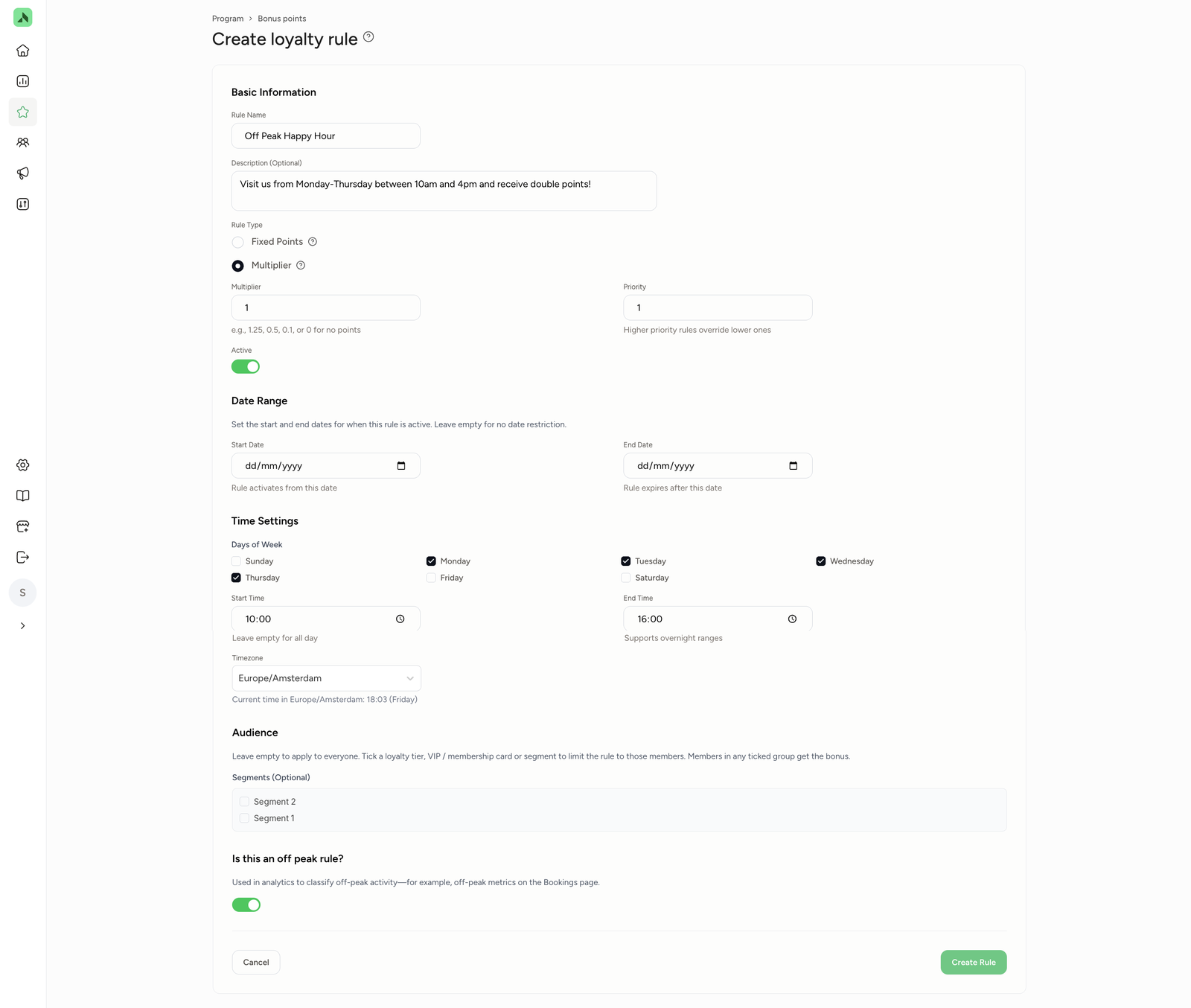
Creating a bonus points rule- Go to Program > Bonus points and click Create New Rule.
- Give the rule a name and, if you like, a description members will see, for example "Off Peak Happy Hour: come in Monday to Thursday between 10:00 and 16:00 and earn double points".
- Under Rule Type, choose how the bonus works:
- Multiplier: the points a member would normally get are multiplied by the number you enter. If a member normally gets 60 points for a visit, a multiplier of 2 gives them 120 (60 × 2) and 1.5 gives them 90 (60 × 1.5). You can also enter lower values, like 0.5, or 0 for no points at all.
- Fixed Points: members get a fixed number of extra points on top of their usual points.
- Enter the Priority. This decides which rule wins when more than one multiplier applies (see Priority below). Switch the rule on with Active.
- Under Date Range, set a start and end date. Leave it blank and the rule stays active indefinitely.
- Under Time Settings, choose the days and times the rule applies, for example for off-peak hours: Monday to Thursday from 10:00 to 16:00. Leave the times blank and the rule applies all day. Double-check the time zone too.
- Optional: under Audience, choose who the rule applies to. Leave it blank and it applies to everyone. Tick a tier, VIP or membership card, or segment, and only those members get the bonus.
- Is it an off-peak rule? Switch on Is this an off peak rule? This activity will then count as off-peak in Analytics, for example in the off-peak figures on the Bookings page.
- Click Create Rule.
Whenever a visit, treatment or purchase falls within the rule, the member gets the bonus points automatically.
Priority: tier or bonus rule?A member never gets two multipliers at once. Say a member already earns 1.5 times the points thanks to their tier, and there's also a double points bonus rule running. Only one of the two counts. The bonus rule's priority decides which:
- Priority 1: the bonus rule wins. The member gets the bonus rule's multiplier. Their tier multiplier doesn't apply.
- Priority 2: the tier wins. The member gets their tier multiplier. The bonus rule doesn't apply.
Worked example: a member normally earns 60 points per visit. Their tier gives ×1.5 and the bonus rule gives ×2.
- Bonus rule on priority 1 (bonus rule multiplier wins): 60 × 2 = 120 points
- Bonus rule on priority 2 (tier multiplier wins): 60 × 1.5 = 90 points
Want a promotion to apply to everyone, including members in a higher tier? Set the bonus rule to priority 1.
| Goal | Example rule |
|---|---|
| Fill quiet times | Happy Hour bonus: double points Monday to Thursday between 10:00 and 16:00 |
| Tie in with a seasonal moment | Black Friday bonus: double points throughout the Black Friday month, or extra points over the Christmas period |
| Reward a regular promo day | A fixed number of extra points for every visit on your promo day, for example every Wednesday |
| Give loyal customers something extra | A bonus rule that only applies to members in your top tier |